There are basically two kinds of people: those who get a spark in their eyes when they hear the word “shopping” and those who roll their eyes at the thought of having to go to the store and buy something. But whichever side of the fence you’re on, we all love discounts and promo codes and the chance to snatch something “for practically nothing.”
No wonder Black Friday and Cyber Monday are so popular. That’s why we suggest not just joining the shopping frenzy but earning from it.
We’ve put together recommendations for launching eCommerce campaigns for these events, a promising eCommerce offer, and Campaign kits for multiple GEOs. So it’s time to earn some money for your own shopping. Let’s roll!
An expert take from our BizDev Manager Konstantin
Preparing for the sales season
Black Friday is November 27 this year, with Cyber Monday on the 30th. For eCommerce offers, that’s the busiest week of the year. People are already out looking for the deals, and the advertisers are all scrambling to get that traffic.
Black Friday hasn’t been a one-off for a long time. The deals are out in November, and people are looking at them from the very first week of the month. Adobe’s holiday forecast has US consumers spending $47.5bn online during Cyber Week alone.
So the best time to launch is now—thus, you get a week or two of data, and you can go into Cyber Week with a campaign that’s already been proven.
One other thing to bear in mind is that the majority of the shopping will be on mobile. Adobe is predicting that mobile will account for 57.4% of online spend over the holidays this year. That’s why all of the Campaign kits below are mobile-focused. But let’s eat the elephant one bite at a time.
Working with eCommerce offers: Tips from Konstantin
Ecommerce has a low entry level, fast payouts, and plenty of offers to choose from. It’s also a great vertical for beginners to build skills they can later take into other mainstream niches.
Which GEOs to test
During the sales season, eCommerce performs especially well in Tier 1 GEOs like the US, the UK, Italy, France, the UAE, and Germany. In Southeast Asia, the highest performers are Indonesia, Thailand, Vietnam, the Philippines, and Malaysia: mobile-first audiences, a growing middle class, and people who wait for Black Friday deals.
Whatever GEOs you choose, keep one rule in mind: one GEO, one campaign. Every market has its own conversion rates and prices.
Which offers to choose
Go with the big names: Amazon, AliExpress, SHEIN, Shopee, Lazada, and Trip.com. You can find eCommerce offers right in the Offers section on RollerAds, with payouts from 5% to 25%. You can also launch a campaign straight from the offer page with all the necessary settings prefilled and go live faster. Black Friday waits for no one.
Which ad format to pick
All three RollerAds’ formats work for eCommerce. Push lands right on the user’s device, OnClick gives you a huge audience at a low cost, and Direct Click brings high-intent traffic from parked domains. Whichever you pick, go mobile, and in Asia, focus on Android.
Direct Click takes the user straight to your offer, with no banner or creative in between. It’s also the only format where you can target traffic by IAB content categories.
Start with Shopping, Fashion, or Tech, depending on your offer. But results can be unpredictable, so it’s best to test as many categories as possible and then turn off the ones that don’t convert. One click switches off hundreds of zones at once, so there’s no need to do it manually.
How to bid
Bids depend on the GEO and ad format. Before launching, check the average bids in the Rates section on the platform, then use the Traffic estimator inside your campaign to see how much traffic you can get with your bid. Your manager or our support team can also help with recommendations.
To test without burning your budget, start with CPA Goal or smart bidding, and switch to more precise bidding once you have enough data.
With CPA Goal, you set your target cost per action. The system raises bids where conversions come cheap, lowers them where they’re expensive, and cuts zones that don’t perform. This lets you test low-cost and premium traffic sources at the same time much more efficiently. Just make sure you’ve connected an S2S postback first.
Smart bidding is the better choice when conversions are expensive, the offer has a two-step conversion, or you can’t send a postback. Konstantin’s tip: don’t cap your smart bid too low, or you’ll lose the best placements.
Pre-landers, frequency, and creatives
- Pre-landers. For big brands, send traffic straight to the offer, since everyone knows AliExpress. For smaller brands, warm users up with a pre-lander first.
- Frequency. People rarely buy after the first ad, and in a competitive niche, one more reminder can tip the scales. So don’t limit how often users see your ad too strictly.
- Creatives. Keep them honest: show the brand, the product, and the real discount, nothing more.
eCommerce Campaign kits: What’s inside
And finally, on to Campaign kits. If you don’t remember what they are or haven’t tried one yet, head over to our dedicated article, where we explain the nuts and bolts of using them.
For those who need just a quick reminder, here’s what Campaign kits include:
- Ad format and bid model. Which format to run and how to pay for visitors.
- Recommended bids. The average bid to start with and the top bid to stay competitive.
- Traffic preset. A ready-made list of zones and feeds that perform best for this vertical and GEO.
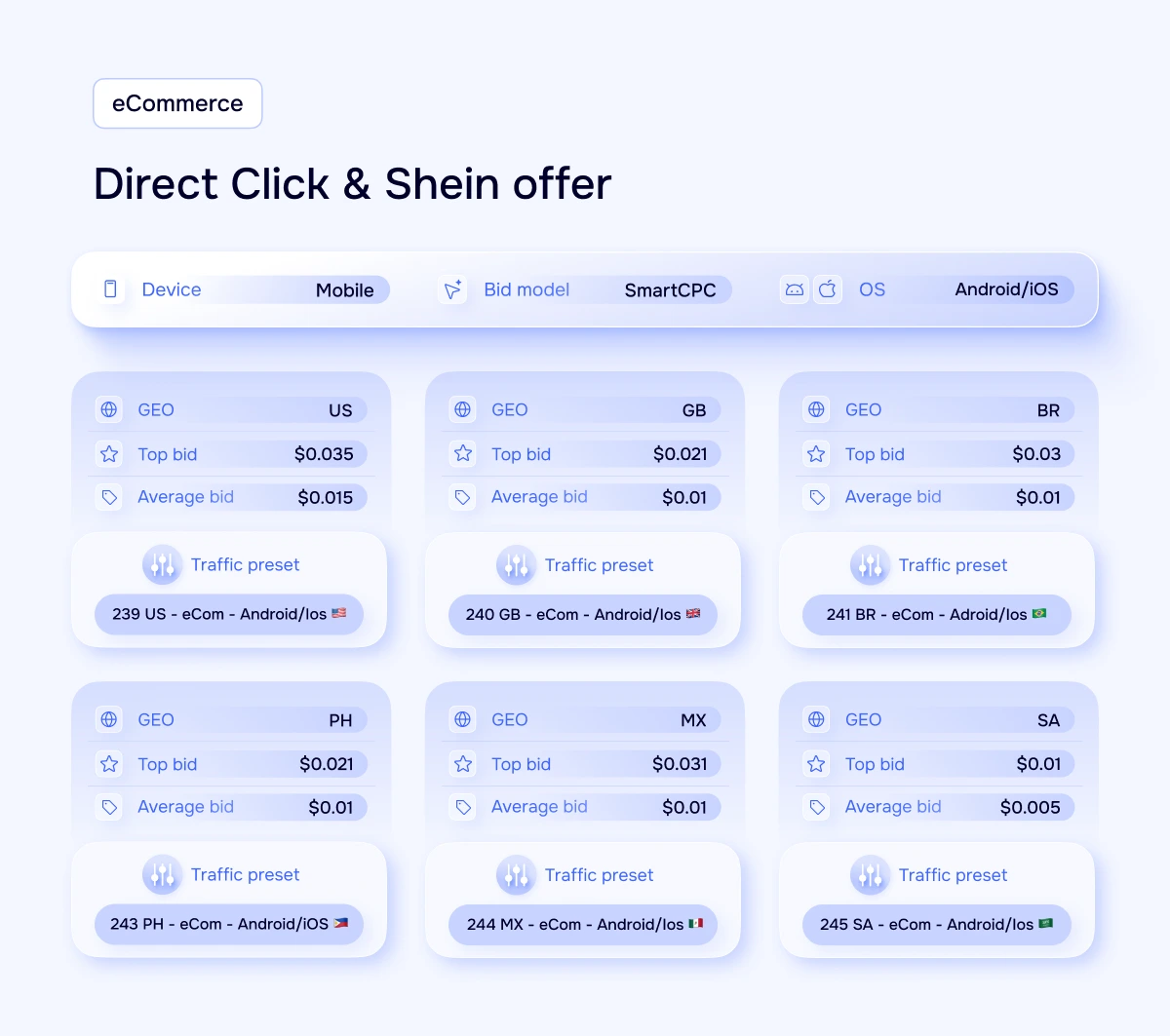
This time, there’s a twist: many kits were made for one specific offer, Multigeo – Shein – RS (ID 1545). You can find it in your RollerAds account under the Offers section. We’ve prepared six kits for Direct Click (one for each GEO) and two for OnClick. There are also two universal Campaign kits for OnClick, suitable for any other eCommerce offer. So let’s see what’s inside.
Direct Click Campaign kits for the Shein offer
Direct Click consists of several high-intent traffic sources and leads users directly to the offer (no page of links in between). Thanks to IAB categories, it is easier to pinpoint your target audience and save time on optimization.
All six kits have the same base settings (mobile traffic, Android and iOS, SmartCPC bid model). You simply pick the GEO and its associated preset. There’s absolutely no need to prepare creatives. For a Black Friday launch, where every day counts, that’s one less thing you’ve got to do.
OnClick Campaign kits: Shein offer and universal eCommerce
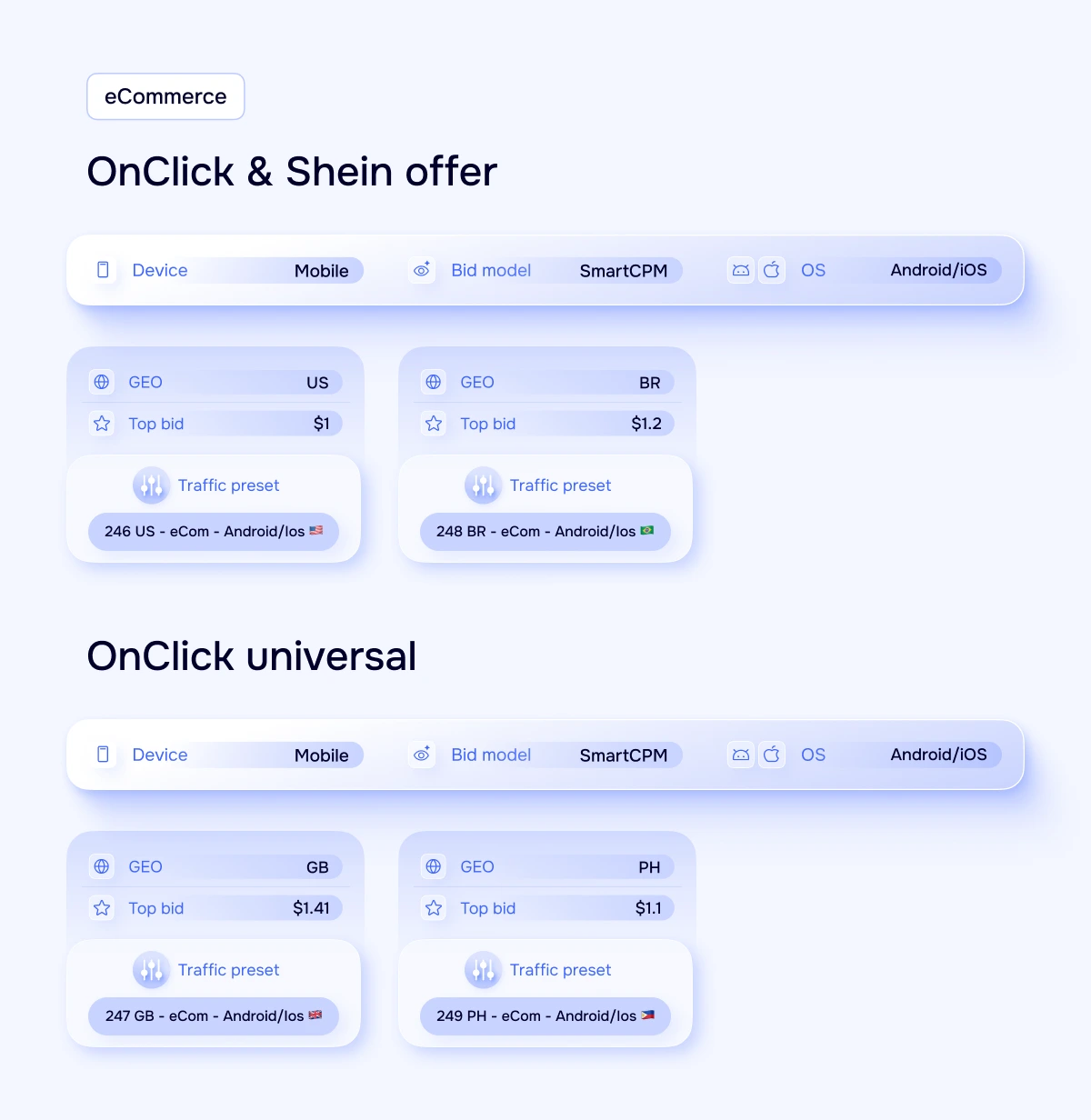
OnClick will open in a new window or tab to show the user your landing page or straight to the offer. Like Direct Click, this does not require creatives. All OnClick kits are mobile only (iOS and Android) and use SmartCPM bidding.
There are two types of kits:
- Built for the Shein offer. The US and GB presets were compiled around this offer.
- Universal eCommerce. The BR and PH presets take the best of the eCommerce zones in those respective GEOs and combine them, so they’re applicable to other shopping offers as well.
How to launch a campaign from a Campaign kit
- Select your own eCommerce offer or use the Shein offer from the Offers section. Use the universal kits for any offer.
- Click New campaign to launch your own offers or click Launch at RollerAds inside the offer’s page if you opt to run our offers. The button will take you to the campaign creation page with all necessary settings already pre-filled.
- Select either Direct Click or OnClick. Select the bid model from the kit: SmartCPC or SmartCPM.
- Go to the Traffic preset tab and select the preset with the same name as in the kit (e.g., 239 US – eCom – Android/iOS).
- Assign a GEO and use the average bid from the kit. Use the top bid if you need more volume.
- Target mobile devices on Android and iOS, set a daily budget, and send the campaign to moderation.
How to get the most out of Black Friday traffic
Starting with a kit is a great start, but you’ll still need to put some work into each campaign. During the season, remember to:
- Use tracking first. Without a postback, how do you know which zones are converting? Check out our guide to postback tracking.
- Remove the ones that aren’t converting. If a zone is getting clicks but no conversions, simply block it and focus on the ones that are converting. With IAB categories, you can block the whole non-performing category with hundreds of zones, without the need of stopping each zone manually.
- Increase the bids for the ones that are working. The run-up to November 27 will be a bit tighter, as advertisers will be competing for the best zones. Be prepared to increase your bids from the average to the top bid in your best-performing zones.
- Do not stop after Cyber Monday. People keep looking for gifts and deals well into December.
Ready for the holiday rush?
Black Friday rewards the well-prepared. The hard bit’s already been done (the format, the bids, and the best zones are all in one place). All you’ve got to do is go live, watch the numbers, and scale the stuff that converts.
Any questions about Campaign kits or offers? Get in touch with your account manager or support team. If you’re new to RollerAds, sign up and get your first Black Friday campaign live today.