There are loads of campaigns out there that are working today which have in fact been tested by someone else first. Someone else has already gone out and paid to work out what angle works in Brazil and what lander is actually grabbing the attention on mobile. A spy tool will tell you all that before you’ve spent a penny of your own on it.
Each tool only covers a slice of the landscape. One is fantastic on TikTok and Facebook, but has nothing at all on Popunders. Another might share a great deal about various Push networks but nothing about social. Most affiliates pick their traffic first and then look for what converts on it, so the tool has to cover that traffic. Otherwise, you’ll pay for data you won’t use.
So the guide is sorted by type of traffic. We’ve checked each tool’s own site for coverage and pricing, and have included the free ad libraries that are definitely worth opening up before you spend a penny. If you run Push on RollerAds, our own Creatives library and Autocreatives are on the list too.
What is a spy tool in the context of affiliate marketing?
Basically, spy tools are just collections of ads from various platforms and ad networks. You’ll see the ad itself, the landing page, the GEO, the ad format, the device type, and generally how long it has been running. Some also reveal the affiliate network or offer behind the ad.
Affiliates typically look at the run time too. An ad that has been live for 60 days is worth a closer look, but it doesn’t prove the campaign is profitable: it may still be in testing, run at break-even for volume, or pay off through another funnel. So treat it as one signal, not the answer.
Spy tools are useful for three jobs:
- Finding angles before a test. See how others are pitching the same type of offer in your GEO.
- Checking the competition. If a GEO and vertical are full of long-running ads, you can expect higher bids.
- Fixing a campaign that’s stalled. When CTR starts to drop, fresh ideas from live ads can help you rework your own creatives.
How we compared
We put that list together at RollerAds. RollerAds is an ad platform not a spy tool so none of the third-party tools on that list are ours, and there are no affiliate links in there. We’ve also added our own Creatives library and Autocreatives, which are free tools for RollerAds advertisers.
- Criteria: ad formats covered, number of networks/platforms, GEO coverage, starting monthly price, and whether there’s a free plan/trial/demo.
- Sources: each tool’s own site and help pages. We haven’t used any third-party reviews for the facts.
- Date checked: November 17, 2026. Prices are always in a state of flux and many of the tools will be on seasonal discount at various times of year so be sure to check the pricing page prior to purchase.
Where a tool’s site gave two different figures for the same thing we’ve gone with the more careful of the two.
Spy tools at a glance
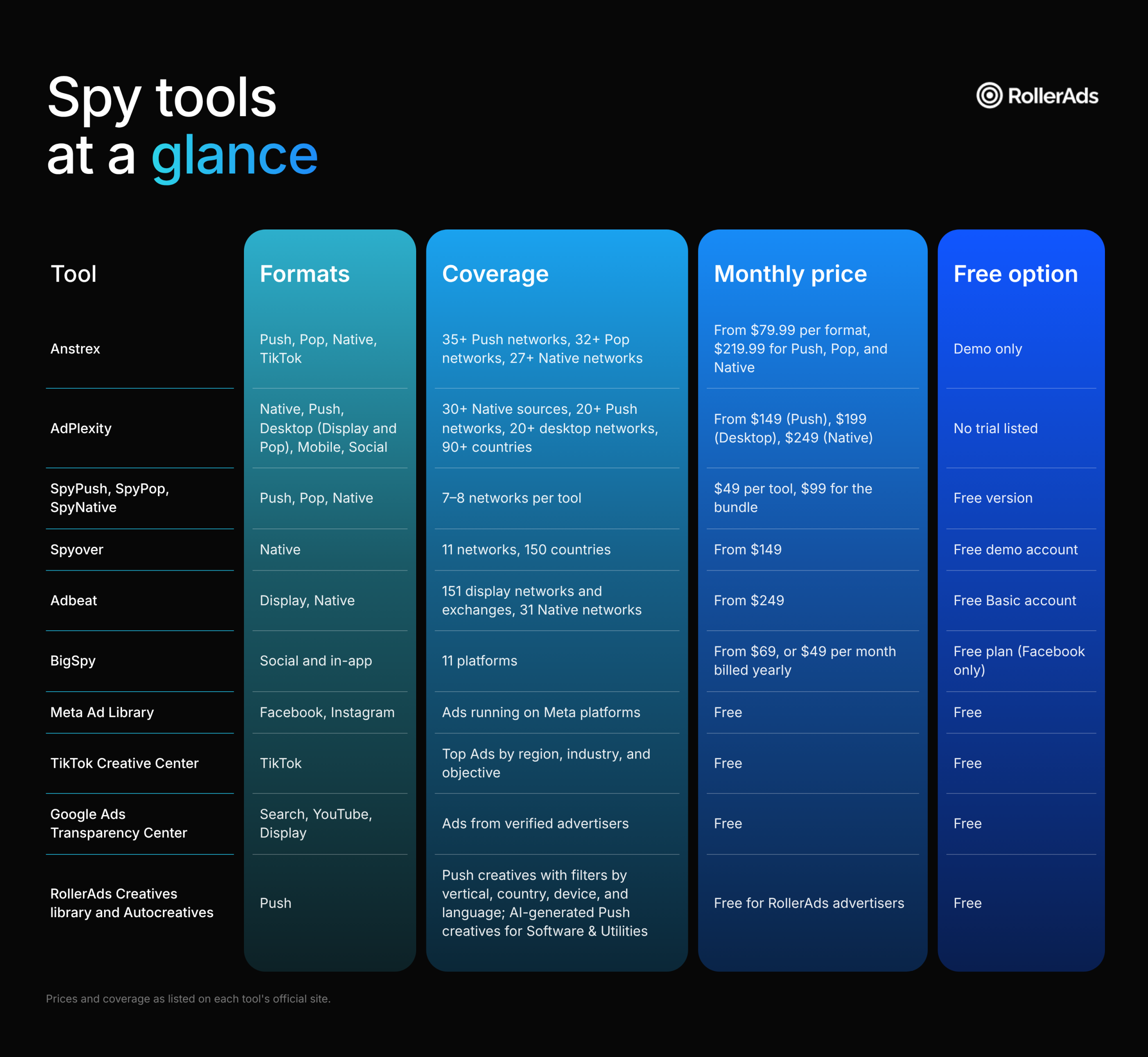
Spy tools for Push, Pop, and Native traffic
If you’re buying traffic via the ad networks (not via social media) then you’ll want to look at those tools as they’re the best way you’re going to get any real insight into how the campaigns are actually being run on Direct Click, OnClick (Popunder) and Push.
Anstrex
Anstrex has databases for Native, Pops, and Push. There’s also InStream, their library for TikTok ads. Their Push database has over 35 networks in 92 countries. You can choose In-page push or classic Push. Their Native database includes 27+ networks including Outbrain and Taboola.
The Pops product is the one we’d point to. It’s 32 plus Pop networks and RollerAds is on that list so you can see what’s already live on our OnClick traffic before you even go and launch your own test.
Each one is $79.99-$89.99 depending on the format. All three together are $219.99 per month. The comparison tables will at various points list a lower price so you’ll want to check the final price at checkout.
Keep in mind there’s no free trial, just a demo. Anstrex also makes it quite clear they don’t offer refunds for product dissatisfaction or unsuitability.
AdPlexity
AdPlexity is broken down into separate platforms: Native, Push, Desktop, Mobile, and Social.
- Native covers 30+ traffic sources (Taboola, Outbrain, MGID, RevContent, MSN, Yahoo, etc.). $249/month or $208/month billed annually.
- Push covers 20+ Push networks (EvaDav, Adsterra, etc.). $149/month or $124/month billed annually.
- Desktop shows banner and Pop ads from 20+ networks (HilltopAds, Clickadu, Zeropark, PopCash, etc.). Cost is $199 per month or $166 per month billed annually.
In essence, AdPlexity makes the most sense if you are primarily targeting one type of traffic. If you need both Pop and Push ads, two plans quickly add up. There’s no free trial mentioned, but you can request a demo.
SpyPush, SpyPop, and SpyNative
The cheapest choice is SpyPush. This is a series of tiny tools, each focused on one format. SpyPush gathers information about Push ads from AdMaven, Adsterra, EvaDav, PropellerAds, RichPush, and a few others. SpyPop collects data about Pop ads from AdMaven, Adsterra, PropellerAds, PopAds, and PopCash. Finally, SpyNative gathers data about Native networks like Revcontent, Outbrain, MGID, Taboola, and others.
Each tool is $49 a month, and the SpyCombo bundle has them all for $99. There’s a free version, so you can have a look at the interface before paying. The coverage is less than that of Anstrex or AdPlexity, and the site doesn’t tell you how many countries are covered. For a first impression of the format, that’s enough.
Spyover
Spyover is all about Native ads. It’s monitoring 11 networks across 150 countries (Outbrain, MGID, and Taboola are all in the mix). The Professional plan is $149/month with 2 simultaneous sessions, and the Corporate plan is $299/month with 6. There’s a free account available with a limited database.
Adbeat
Adbeat is built for display and Native research. It covers 151 display networks, DSPs, and exchanges, plus 31 Native networks. You also get publisher placement data so you can see precisely where your competitors’ ads are appearing.
Standard is $249/month, 35 countries, 90 days of data. Advanced is $399/month, all countries, full year of data. There’s a free Basic account and a 30-day money-back guarantee on the paid plans. If you’re predominantly a Push and Pop user, then Adbeat won’t be of much use to you, as that’s not what it was built for.
Spy tools for social ads
BigSpy
BigSpy covers the broadest range of social platforms of any of the tools on our list (11 in total) with Facebook, Instagram, Google Ads, YouTube, TikTok, X, Pinterest, Yahoo, Unity, Pangle, and AppLovin.
Free plan is just Facebook. Starter is $69/month ($49/month if billed annually) and that’s Instagram and AppLovin in there. To get the eight platforms you need Growth at $159/month. Ultimate with all 11 is $499/month.
Social spy tools are still useful if you’re going in for Push or Pop traffic. A good hook on TikTok can be turned into a great Push title and a Facebook eCommerce lander that’s been running for months is going to tell you a lot about the offer.
Free ad libraries worth checking first
Before you pay for a tool, open these up. They’re free and come directly from the platforms. They won’t tell you about landers or run time for every ad, but they’re very good for creative ideas.
Meta Ad Library
The Meta Ad Library allows you to search for ads that are running on Facebook and Instagram by keyword or by advertiser. It’s a useful tool for seeing how a brand is pitching its product and how many creative variations it’s testing at any one time.
TikTok Creative Center
Top Ads in Creative Center is a free tool where you don’t need to log in to see a series of the best creatives on TikTok. You can narrow these based on objective, industry, or location. Each is accompanied by a graph that shows engagement at every point.
Google Ads Transparency Center
The Google Ads Transparency Center shows the ads of verified advertisers across Search, YouTube, and Display. For each ad you can see the regions it ran in, the format, and when it was last shown. Very useful if you want to check how a particular brand is advertising in a particular country.
RollerAds Creatives library and Autocreatives
If you run Push campaigns on RollerAds, you don’t need a separate tool to find creatives. The Creatives library is free for RollerAds advertisers and collects Push creatives from third-party sources. You can filter it by vertical, country, device, and language, and each creative shows an approximate CTR. Use it to see which angles get clicks in your GEO, then build your own versions. Keep in mind that the CTR comes from other bidders’ campaigns, so it’s a rough guide.
Autocreatives take a step further: the platform picks AI-generated Push creatives and optimizes them for CTR in each zone. For now, they’re available for Software & Utilities offers, in two categories: policy and aggressive.
How to use spy tools without copying
A spy tool will tell you what works. It won’t give you a campaign. Just copying a creative or lander 1:1 is a very risky thing to do. The original owner may well own the rights to it. Networks may reject the copy during moderation, and the ad that worked for someone else may have been burned out already.
Here’s a simple routine that works better:
- Pick one GEO and one format. If you search everything at once, you just get noise. Start with the GEO that you actually intend to buy the traffic in.
- Filter by run time. Look at the ads that have been live for a few weeks or more. Long-running ads show what people keep investing in, and fresh ones show what they’re trying out.
- Group what you find by angle. Discount, curiosity, fear of missing out, problem and solution. You’ll typically see two or three angles that dominate a GEO, and that’s your shortlist.
- Look at the landers. For Pop traffic, the lander is absolutely everything, as there’s no ad creative for the user to see first.
- Build your own version. Keep the angle, change the wording and visuals. Then go and test two or three of the variations against each other.
- Track the results. You won’t know which version has won without a tracker. Our list of affiliate tracking tools will help you pick one.
What to look for, depending on the format
Depending on the format you want to test, you might not be looking for the same thing.
- Push. You’re looking at a creative (title, description, image, and icon), and you want to see how long the titles are and what hooks are still active in your GEO. More about Push creatives in our Push notifications guide.
- OnClick (Pop ads). There’s no creative here, you’re just spying on an offer or a lander. The tool you’d want to use would be something like AdPlexity Desktop, SpyPop, or Anstrex Pops (a Pop tool).
- Direct Click. No creative at all. You can send users straight to the offer, but most advertisers add a prelander or landing page to warm them up first, so spy on the landers and offers.
Still not sure what format you’d like to test? Have a look at our guide which compares Direct Click, OnClick, and Push.
FAQ
Are spy tools legal?
Yes, they are. They gather the ads already publicly displayed. Just remember, using someone else’s content or landing page literally as it is (not rewritten) could be problematic because it might be copyrighted and not approved by the ad network. At RollerAds, we don’t use our users’ creatives.
Is there a free ad spy tool?
The free official libraries are the Meta Ad Library, the TikTok Creative Center, and the Google Ads Transparency Center. Of the paid tools, BigSpy has a free plan for Facebook, SpyPush has a free version, and Adbeat has a free Basic account. If you run Push on RollerAds, our Creatives library is free too.
Which spy tool is best for Push and Pop traffic?
It’s all down to budget and how many formats you’re running. Anstrex covers the most Push and Pop networks on our list. AdPlexity is a strong pick if you’re running just one format. SpyPush and SpyPop are by far the cheapest way to get going. If you run Push on RollerAds, start with our free Creatives library: it collects Push creatives from third-party sources.
The bottom line
There’s no single best spy tool. It’s going to be the one that suits the traffic you’re buying. For network traffic, you’re looking at Anstrex, AdPlexity, or SpyPush depending on your budget. For social, you can pretty much cover yourself with BigSpy or the free platform libraries.
Whatever you do, use it to find angles, not to copy. Then go and test your own versions on real traffic. If you’re interested in giving Push, OnClick, or Direct Click a go, then sign up for RollerAds and ask your Account Manager what format they’d suggest would be most appropriate for your offer.